
Build portable Windows executables from Python projects – without guesswork, without “Status: building”.
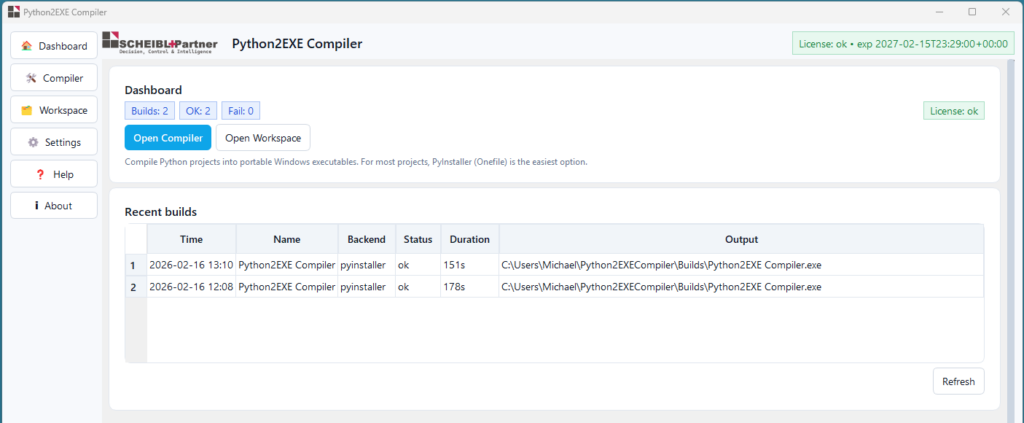
Most Python projects don’t fail because of code. They fail at the last 10%: packaging. Missing assets, wrong entry points, messy environments, silent build steps, and “works on my machine”. Python2EXE Compiler turns that final 10% into a predictable workflow: visible steps, reproducible builds, clean output.

A tool by SCHEIBL+Partner – Decision, Control & Intelligence.
Why “Python → EXE” wastes time in real projects
Building an executable isn’t “just a click”. It’s a chain of decisions that come back later: Onefile or Onedir? Console or GUI? Which assets must ship? Which imports are dynamic? Which virtual environment is the truth? And most importantly – where is the build stuck right now?
People usually patch this with copied commands, outdated snippets, and trial-and-error. The result: a build that works once, then breaks two weeks later. Python2EXE Compiler exists to stop that loop.
What Python2EXE Compiler does differently
Reproducible build environment
Optional project build-venv setup and dependency installation so you can rebuild reliably later – not “something similar”.
Live build log with step markers
You see every step: venv creation, pip installs, backend install, build start, work/spec paths, output. No blind waiting.
Asset bundling that actually starts
GUI apps often fail because assets aren’t shipped (icons, QSS/themes, templates). The compiler explicitly bundles typical non-Python resources so the EXE doesn’t crash on launch.
What you actually get (the parts that matter)
You’re not paying for “features”. You’re paying for control and time saved. Packaging problems are expensive because they create support loops: missing files, inconsistent environments, unclear logs, and builds that can’t be reproduced. Python2EXE Compiler gives you a build process you can repeat, explain, and ship.
Onefile vs Onedir – choose intentionally
Onefile is convenient to distribute. Onedir is often more transparent and more robust for assets and plugins. Choose per project without rebuilding your command chain from memory.
PyInstaller or Nuitka – fit the goal
Different projects need different tradeoffs (startup speed, size, compatibility). Switch backends without reinventing your workflow.
BuildHelper folder where it belongs
Work/spec/build artifacts stay organized in a predictable “BuildHelper” structure (not randomly inside Documents). It’s traceable, clean, and removable.
Who this is for
Python2EXE Compiler is for people who must actually deliver Windows executables – not just run code locally.
- Builders of internal utilities who need portable EXEs (no installer, no Python on target PCs)
- PySide6 / GUI projects that must ship assets reliably
- Consultants / analysts who deliver executables to stakeholders
- Teams that need reproducible builds and clear logs for support
HOW IT WORKS
- Select your project folder
- Choose the entry script (e.g.,
app.py/main.py) - Select backend (PyInstaller/Nuitka) + mode (Onefile/Onedir, Console/GUI)
- Run build – watch every step in the live log
- Ship output – EXE in your chosen output folder, artifacts organized
Why teams buy this
Because packaging is where hidden costs live. Not in the first build – in the second and third one. When someone else has to rebuild it. When a client reports “it doesn’t start”. When a missing theme file breaks a GUI. When the environment changed and nobody remembers why it worked last month.
Python2EXE Compiler reduces that cost by making the build predictable: visible steps, structured output, and fewer “mystery failures”. It’s a small price for a tool that prevents repeated hours of debugging and rework.
Built by SCHEIBL+Partner – focused on traceability, clarity, and decision-ready artifacts.
DOWNLOAD & Request a License for €9.99 / year
The license includes use of the tool and updates during the license term. For teams and multi-device setups, please request a team license via contact.
Licensing (simple + clear)
License model: Only €9.99 / year (personal / single primary device)
A license includes tool usage and continuous updates during the license term and is valid for one primary device (your evaluation machine).
For teams and multi-device setups, request a team license via contact.
FAQ
Q1: Is the generated EXE really portable?
A: In most cases, yes: the goal is an executable that runs on Windows machines without requiring Python installation. For best results, build on Windows because native dependencies and DLLs matter.
Q2: Onefile vs Onedir – which should I pick?
A: Onefile is easier to distribute. Onedir is often more transparent and robust, especially for assets and plugins. The compiler supports both.
Q3: Why can builds take a long time “without output”?
A: Large wheels (e.g., PySide6), analysis phases, and bundling can be CPU/IO heavy. The live log shows whether you’re in pip install, analysis, or final bundling.
Q4: Can antivirus flag the EXE?
A: False positives can occur with packaged executables depending on compression and mode. Onedir builds, code signing, and conservative settings can reduce risk.
Q5: Does it work for PySide6 / GUI apps?
A: Yes – that’s exactly where reproducible builds and asset bundling matter most.
Q6: What is sent during license checks?
A: License key plus technical device identifiers needed to validate and bind the license. No analytics tracking. See the privacy information on the website and in-app notice.
Q7: Can I add custom PyInstaller arguments?
A: Yes – you can add advanced flags when needed (e.g., debug log level, hidden imports).
Q8: How do I get support if my build fails?
A: Send the relevant lines from the live build log – that makes the problem actionable and reproducible.